
Designing with Word - Never Again!
One of my mottos is 'the right tool for the right job.' - Martha Stewart

Microsoft Word is a word processing software used by millions of people every day. In fact, I bet that is the software that is installed on your work computer, and probably on your home computer.
Word is a great program for producing all kinds of documents:
letters
reports
memos and
articles.
What Word is NOT is a graphic design program. Can it be used to design posters, invitations and brochures? Sure, BUT it's clunky, difficult to navigate and can be extremely frustrating to manipulate if you are trying to design something.
In today's day and age there is absolutely no reason to be using Word to design graphics! In this blog post, I will suggest a better alternative - Canva.
The Word Way
Let's look at a poster for a Lenten Retreat created using Word.
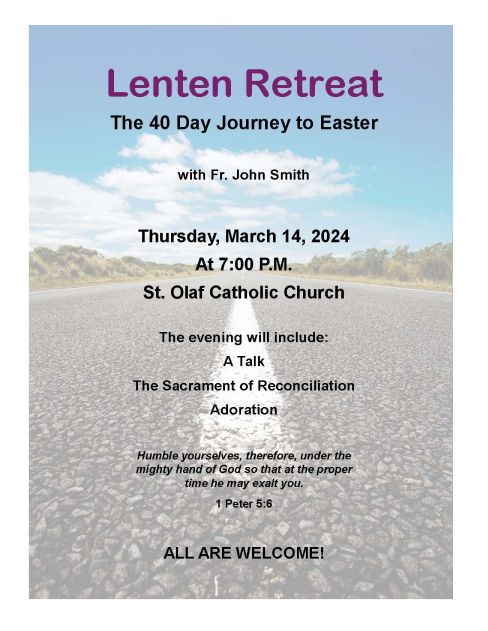
This poster is not horrible. All the information is there and it's easy to read - but kinda boring.
Let's start with the photo. While it is not that noticeable, the photo did not fit perfectly so I had to stretch it a bit. Because the photo is of a road and a horizon the distortion caused by stretching it is almost unnoticeable. However, if there had been people in the photo, they may have looked like people do in a hall of mirrors. 🥴
Next up the fonts. Trying to decide which fonts to use and what size are also a bit of a problem. Too many different fonts and the whole thing is a mess. But if you don't change at least the size, color and formatting of the text it won't look much better.
And don't get me started on trying to remember how to get the text boxes and photo to move where I want them to go and to stay put.
A Better Way!
If you want a truly gorgeous poster, the best way is to hire a professional graphic designer. But let’s be honest — most Catholic parishes don’t have that kind of budget.
Thankfully, a few creative minds in Australia came up with a simpler, more affordable solution: Canva — a free, web-based design tool that makes creating beautiful posters, flyers, and social media graphics easy for anyone, no experience required.
What is Canva
Canva uses a simple drag-and-drop system with ready-made templates designed by professionals. You can quickly create posters, flyers, and social media graphics that look polished and inviting — even if you’ve never studied design.
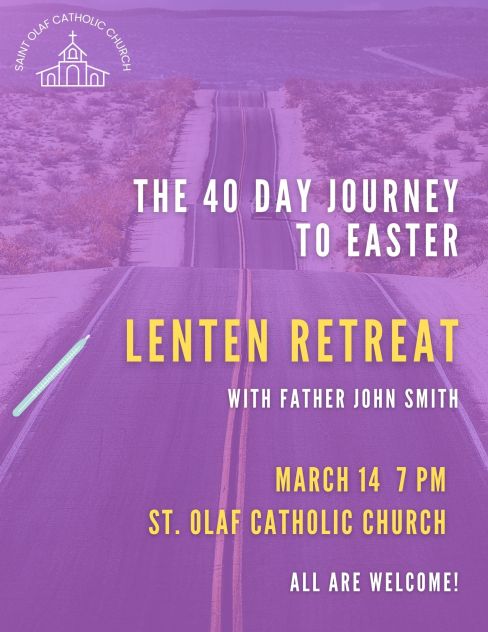
Here’s that same Lenten Retreat poster, now redesigned in Canva — cleaner, sharper, and much more likely to grab attention.
Canva - the FREE Version
If you do not already have a Canva account, I highly recommend one. There is a paid version but you can definitely start with the free version. It has everything most parishes will ever need — templates, photos, icons, and fonts. One of its unexpected perks is that your choices are limited. Think of it like walking into Baskin-Robbins with 31 flavours — so many that you end up choosing plain vanilla! With the free version of Canva, the smaller selection actually makes the choice of template more manageable. You can focus on creating something beautiful instead of scrolling endlessly through options.
You can always upgrade later, but the free version is more than enough to get your parish looking great online and in print.
Getting Started
Go to canva.com and create a free account today. Take a few minutes to explore the dashboard, experiment with a template, and you’ll be amazed at what you can do.
In my next post, I’ll walk you through creating your first design.
See you soon! 👋
Facebook
LinkedIn